



When your model airplane decals are not sticking, silvering, or wrinkling into the panel lines, the fix usually starts before the decal ever hits the water. Master the surface-and-solution sequence and you will have markings that look painted on.
Why Your Decals Keep Failing (And Why It’s Not Your Fault)
The roundel looked perfect on the paper. Then, five minutes after it touched the wing, the clear film turned frosty around the edges. If you have ever watched a beautifully placed marking turn milky, lift at the corners, or wrinkle into something that looks ruined, you already know the frustration behind the search phrase “model airplane decals not sticking.” This happens to every builder eventually, and it is almost never a sign that you did something uniquely wrong.
Here is the reassuring part, and the controlling idea of this guide: model airplane decals fail mostly because the model surface, not the decal, is wrong. Flat paint is microscopically rough, and that roughness traps air beneath the transparent carrier film, creating the milky or silvered look beginners dread. Decal setting solutions are not cosmetic extras. Micro Set prepares the surface, improves the adhesive bond, and reduces the air bubbles that reveal carrier film. Micro Sol softens the film so it conforms over surface details, producing that “painted on” look you are chasing. What follows is a repeatable sequence, not a product review, that works for kit decals, aftermarket national markings, stencils, and most common aircraft surfaces once the surface is properly glossed.
What Causes Decals to Fail: The Science Behind the Stick
A decal is a simple layer stack: an ink layer, a clear carrier film, a water-soluble adhesive, and a paper backing. The water you soak it in does not bond anything; it only activates and releases that adhesive from the backing. Beginners often assume the water is the glue, but it simply lets the decal slide free. Three failure modes account for nearly every decal disaster.
- Silvering is a surface-contact problem. Flat paint scatters reflected light because its surface is rough, while gloss paint reflects light uniformly because it is smooth. When the decal dries over a flat surface, the carrier film bridges the microscopic peaks and traps air in the valleys, and light reflecting through those pockets makes the clear film look silvery. The carrier film is both necessary and troublesome: it holds the marking together, but it extends beyond the design and shows when it traps air.
- Lifting and peeling are different, though poor prep contributes to both. A dusty, oily, too-dry, or incompatible surface prevents the water-soluble adhesive from forming a complete bond before the water evaporates. Microscale designed Micro Set around this problem: it prepares the surface with wetting agents that cut the oils in new paint and converts the adhesive on the back of the decal to a stronger and longer-lasting one.
- Wrinkling and tearing make up the third mode, and the distinction between normal and permanent matters. Setting solution softens the decal and can make it look wrinkly, but the film pulls down tight as the solution works. Microscale gives the safety rule: after Micro Sol is applied, the decal is very soft and could be easily damaged, so it should not be touched until it has dried. Permanent damage happens when a builder brushes, drags, or repositions a decal while it is softened. Do not wipe, do not drag, and do not chase wrinkles while Micro Sol is active. The routine ahead works because it controls surface smoothness, adhesive contact, and film softening in the right order.
Tools and Supplies: Everything You Need Before You Begin
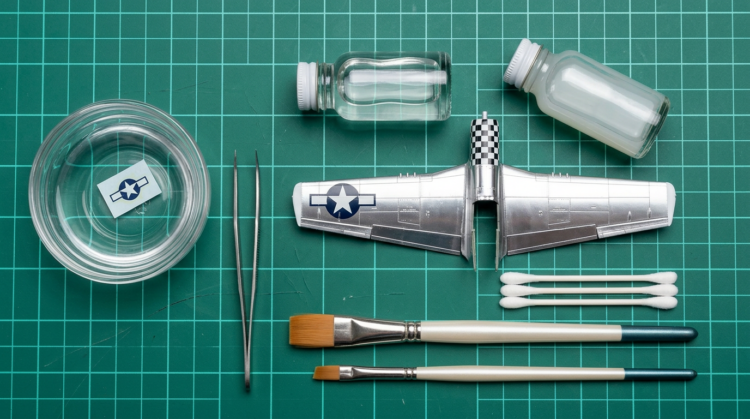 Treat this as a short checklist rather than a shopping spree. Because setting-solution strengths differ and compatibility varies between decal brands, the product names below are examples, not mandates.
- Decal setting solution (for example, Microscale Micro Set MI-1) — applied to the model surface first to improve wetting, adhesion, and repositionability.
- Decal softening solution (for example, Microscale Micro Sol MI-2) — applied over the placed decal to soften the film so it conforms; do not touch it while it is active.
- Gloss clear coat — examples include Tamiya TS-13 synthetic-lacquer spray and hobby acrylic gloss clears. Choose compatibility over brand loyalty.
- Soft flat artist’s brush — Microscale specifically recommends a soft flat artist’s brush for applying both Micro Set and Micro Sol.
- Soft cotton swabs (Q-tips) — for sliding, nudging, blotting, and pressing decals without using your fingers, which introduce oils and lateral force.
- Fine-point tweezers — to hold backing paper or remove excess clear film, not to pinch the printed wet decal itself.
- Clean water — a small bowl of clean water; distilled water is cheap insurance where mineral-heavy tap water leaves deposits.
- Final clear coat (flat, satin, or gloss) — chosen to match the aircraft finish and dusted on lightly to avoid curling decals.
A note on cost: hobby prices and stock change constantly, so this guide names categories and points you to current manufacturer or retailer listings rather than quoting figures. Micro Set MI-1 and Micro Sol MI-2 are part of Microscale’s finishing-products line, alongside Micro Coat Gloss, Satin, and Flat.
Surface Preparation: The Non-Negotiable First Step
If there is one section to read twice, it is this one. The most common beginner mistake is applying decals directly to a matte or flat finish. As the FineScale source puts it, the key to a flawless decal job is a smooth, glossy paint job underneath, and the water-slide decals in almost every airplane kit are designed to stick to glossy paint. A glossy intermediate coat is mandatory, not optional polish, because gloss levels the microscopic texture of matte paint so the back of the decal lies closer to the model and traps less air. Paul Boyer’s guidance is even more forceful: decals adhere far better to a glass-smooth finish than to a flat finish, and the gloss should be applied over the entire model for an even appearance.
- Step 1: Confirm the paint is cured. A minimum of 24 hours after the final color coat is a safe rule, and longer is wise for enamels, heavy coats, or humid conditions. Uncured paint can trap solvent, imprint, or react under a clear coat.
- Step 2: Apply a thin, even gloss clear coat over the model or over all decal areas. Tamiya describes TS-13 as a 100 ml Gloss Clear spray and identifies the TS line as synthetic lacquer that cures in a short period of time, making it a legitimate rattle-can option when handled with lacquer precautions. Lacquer clears can be hot, so mist them on in light coats, test on a spare part first, and never flood them onto decals or uncured paint.
- Step 3: Let the gloss cure fully before decals — a 12-to-24-hour minimum is conservative, especially before you introduce setting solutions.
Pro readiness test: Hold the wing or fuselage at a shallow, raking angle under a workbench lamp. A continuous, mirror-like reflection means the surface is ready; if the reflection breaks into dull patches, it is still too rough for risk-free decals.
A common-mistake warning: satin or semi-gloss is a compromise, not an equal substitute. Gloss clear prevents silvering; a matte finish creates it. Satin may be smoother than flat, but it can still leave enough texture for mild silvering under broad carrier film.
You do not need an airbrush. Modelers without spray equipment can brush on a self-leveling acrylic gloss where decals will go. Future/Pledge floor finish was the classic brushed-on option, and it still works if you already have it, but it is no longer a dependable label on U.S. store shelves. FineScale Modeler has discussed alternatives to Pledge Floor Gloss, also known as Future, naming AK Interactive Glass Coat Gauzy Agent and Holloway House Quick Shine Floor Finish. The practical advice for 2026 is to reach for an available hobby gloss clear or a current floor-finish alternative rather than hunting a discontinued label.
The Step-by-Step Decal Setting Solution Routine
This is the heart of the guide. Work one decal at a time, and resist the urge to rush.
- Step 1 — Soak the decal. Cut one decal from the sheet, dip it into clean water, set it on your work surface, and leave it alone for roughly 20 to 30 seconds. Treat that as a starting point, because older, thicker, or aftermarket decals may need more or less time. The readiness signal is motion, not the clock: once water penetrates the paper backing, the decal should slide freely. Wait for release, not for the decal to float away on its own, because uncontrolled floating invites folding, adhesive loss, and misplacement.
- Step 2 — Apply Micro Set to the model surface. Using a soft brush, lay a thin, even coat of Micro Set on the gloss-coated area where the decal will sit. Microscale says Micro Set should be applied to the surface of the model where you will be sliding the decal off the paper backing. It is a slip-and-grip layer: it wets the surface for positioning, prepares the paint with wetting agents, improves adhesive strength, slightly softens the film, and helps prevent the air bubbles that reveal carrier film. Cover the whole decal footprint, including the transparent film edges, because edges are where lifting and silvering tend to show.
- Step 3 — Float and position the decal. Slide the decal off its backing paper with the brush, not your fingers, onto the wet Micro Set surface. Use a slightly damp cotton swab to nudge it into final alignment without touching the printed face. Keeping the decal wet while you move it reduces the risk of tearing.
- Step 4 — Remove excess water and adhesive. Blot, do not wipe. Touch a clean cotton swab to the edge of the decal to absorb excess water and setting solution, working from the center outward. Microscale advises blotting carefully with tissue or paper toweling without disturbing the decal’s position. A gentle rolling motion works the liquid out from underneath without shifting or tearing the marking. Never scrub laterally.
- Step 5 — Wait before applying Micro Sol. Let the decal settle until it no longer slides easily, typically 5 to 10 minutes. The real test is that the decal will not move, not the elapsed time.
- Step 6 — Apply Micro Sol for conforming. With a small flat brush, apply a single coat of Micro Sol over the placed decal, using as few strokes as possible. Microscale describes Micro Sol as the solution for the most difficult jobs: “Micro Sol setting solution is for the most difficult irregular surfaces to be found on models. It completely softens the Microscale Decal, allowing it to drape down onto the surface of the model, conforming perfectly to surface irregularities without distortion.” This is where the decal becomes part of the painted surface, settling into panel lines, over rivets, and around curves.
- Here is the capital-letter rule: apply one coat, then do not touch. The setting solution softens the decal and can make it look wrinkly — this is normal. Leave it alone and the film will pull down tight as it dries. Microscale is blunt about why you must keep your hands off: “Do not touch until the decal has dried, as the decal is very soft at this stage and could be easily damaged.”
- Step 7 — Evaluate and repeat only if needed. After the decal dries, inspect it. One application is enough in most cases, but a second coat of Micro Sol can help if it has not fully conformed to a deep panel line or complex contour. For stubborn details, several coats may be needed, each allowed to dry completely between applications.
- Step 8 — Seal after a full cure. Once all decals are fully cured, wait at least 24 hours before the final clear coat unless the maker specifies longer: If you applied only Micro Set without Micro Sol, Microscale’s instruction is to allow the decal to dry overnight before a protective coat. Then dust on a flat or satin clear (or gloss, to match your finish) to unify the sheen, dull any decal shine, and protect the markings. Apply it in several light applications, because a thick wet coat can curl or dissolve decals.
One rule ties the routine together: never reverse the two bottles. Micro Set goes under, before the decal is positioned; Micro Sol goes over, after the decal is stable. A close-up comparison of the same decal on a flat surface versus a gloss surface dramatically illustrates the silvering effect, and it is worth studying before you commit to a real marking.
Micro Set vs. Micro Sol: Which One Does What?
Mike Ashey describes the distinction cleanly in Building Scale Model Aircraft: “The liquid in the blue labeled bottle is called micro set and you apply it to the surface to be decaled just before applying the decal. The liquid in the red labeled bottle is called Micro Sol and it is applied to the decal’s surface after the decal is set in place to soften it and to get it to conform to any raised or engraved detail on the model’s surface.”
- Micro Set — blue bottle; goes on the model surface first; improves wetting and adhesion; gives you positioning slip before the decal grabs.
- Micro Sol — red bottle; goes over the placed decal; softens the film to conform into panel lines, over rivets, and around curves; leave it untouched.
- The rule: Set first, then Sol. Never reverse the order.
Troubleshooting: When Something Goes Wrong
Even with a careful routine, things occasionally go sideways. Treat these as rescues, and remember that prevention is more dependable than repair.
- Problem 1 — Silvering has appeared. The root cause is trapped air below the clear carrier film, most often because the surface was matte, satin, rough, dusty, or insufficiently glossed. For mild cases, apply a thin coat of softening solution and let it work. For trapped-air pockets, prick the carrier film very carefully with a clean fine needle or a fresh No. 11 blade tip, apply softening solution so it can wick under the film, and press straight down only when safe. Be honest, though: severe silvering from a rough or uncured base is often a surface-prep failure that no liquid can fully erase.
- Problem 2 — The decal has torn or wrinkled permanently. The main preventable cause is touching or dragging the decal while Micro Sol had it softened, or applying too much at once. The fix is limited. If the decal is still wet and replaceable, remove it with a damp swab or brush, clean the area, and use a spare or aftermarket replacement. If it has dried torn, touch-up paint, weathering, or replacement is usually more realistic than trying to rejoin shredded carrier film.
- Problem 3 — Decal edges are lifting. Likely causes are incomplete Micro Set coverage, excess water left under the edge, a contaminated surface, or adhesive that dried before the edge was pressed flat. The fix is controlled reactivation, not flooding. Use a fine brush to slip a tiny amount of Micro Set under the lifted edge, wait until it relaxes, and press straight down with a damp cotton swab. Do not drag sideways.
One more edge case: tiny air bubbles after the decal looks mostly dry. Pop them with a pin, apply a little more setting solution, and press down where the bubbles were. Different manufacturers’ decals also react differently to different solutions, so it pays to keep more than one brand on hand.
Pro Tips From the Workbench
- Trim the carrier film close to the printed design before soaking. This is one of the most effective anti-silvering moves, because it removes shiny transparent film that would otherwise stay visible on the model. Pay special attention to national insignia, large letters, and clear centers.
- Use a fresh blade and clean cuts. Never tear partially cut areas away from the inked portions, since tight corners rip easily. Two light passes are safer than one forced cut.
- Treat old or brittle decals cautiously. Compatibility varies, so test a spare decal first rather than assuming a setting solution will rescue an entire aged sheet.
- Separate the two bottles on your bench. Mike Ashey recommends putting Micro Set and Micro Sol on opposite sides of the workbench so the applicator swabs do not get mixed up. They look alike but do very different jobs.
- Let paint and clear coats cure thoroughly before decal work, especially with synthetic-lacquer clears such as Tamiya TS-13, to avoid solvent interaction, fingerprinting, and adhesive contamination.
- For large decals over complex surfaces, such as a full upper-wing roundel on a big-scale Spitfire, consider slitting the marking into sections so it conforms with less trapped air, and practice on a spare first.
- Keep your water clean, and reach for distilled water as cheap insurance in mineral-heavy areas. It is not magic, but it removes one variable.
FAQ: Your Decal Setting Solution Questions, Answered
How do I step-by-step apply decal setting solution to a scale model airplane so the decals don’t silver?
Model airplane decals don’t silver when you apply them over a smooth gloss clear coat first, then follow a set-then-sol sequence.
- Cover the painted surface with a smooth gloss clear coat, because gloss levels the rough matte texture that traps air below the carrier film.
- Once the gloss cures, cut one decal, soak it briefly, apply Micro Set where it will sit, and slide it into place with a brush or swab.
- Blot from the center outward, wait until the decal no longer slides, apply Micro Sol, and leave it untouched until dry.
What is the exact process for using Micro Sol and Micro Set on model airplane decals?
The exact process is to use Micro Set first and Micro Sol second.
- Apply Micro Set to the model surface before the decal; it prepares the surface, improves adhesion, and slightly softens the film.
- Position the decal on the wet Micro Set and let it stabilize until it no longer slides.
- Apply Micro Sol over the placed decal to soften the film so it drapes over details, then do not touch it until it dries.
Why are my model airplane decals not sticking even after I soaked them in water?
Your model airplane decals are not sticking because water only releases the adhesive — it does not guarantee a bond to the surface.
- Water releases the water-soluble adhesive from the paper backing, but it cannot make that adhesive grip a rough, dry, dusty, oily, or incompatible surface.
- Micro Set uses wetting agents, cuts oils in new paint, and converts the adhesive on the back of the decal to a stronger and longer-lasting one.
- Make sure your surface is glossy, clean, and cured before applying decals.
How do I fix silvering on model airplane decals after they’ve already dried?
You fix silvering after drying with a careful rescue, but only once the decal can survive handling.
- For mild silvering, apply a thin coat of Micro Sol and let it work undisturbed.
- For trapped-air pockets, prick the clear film with a clean fine needle or a fresh No. 11 blade tip, apply softening solution so it wicks under the film, and press straight down only when safe.
- Accept that severe silvering from a rough base may remain visible; a gloss coat is far more reliable than any after-the-fact fix.
What is the difference between decal setting solution and decal softening solution for scale models?
The difference is that a setting solution improves contact and adhesion, while a softening solution relaxes the carrier film so it conforms.
- A setting solution, such as Micro Set, improves the decal’s contact with the surface and helps adhesion and positioning.
- A softening solution, such as Micro Sol, relaxes the carrier film after placement so the decal conforms over panel lines, rivets, raised detail, and compound curves.
- The beginner rule: Set first, Sol second.

Key Takeaways
- A gloss intermediate coat is the most reliable prevention for silvering, because it removes the rough matte texture that traps air under the carrier film.
- Micro Set goes on the model surface first; Micro Sol goes over the placed decal after it is stable. Reversing the order risks softening the decal before it is positioned.
- Never touch, drag, or wipe a decal while Micro Sol is active, because the softened film is easily damaged.
- Trim carrier film close to the printed image before soaking, especially around national insignia, large letters, and clear centers.
- Most decal failures are preventable with surface preparation, bottle order, and patience; rescue methods exist but are far less dependable than a gloss base and careful handling.